The UK legal research workspace
Legal research,all in one place.
Search an extensive collection of legal documents from different sources and authorities, all within one focused research workspace.
Records as of October 2026. Metadata holdings; public search coverage is separate. Sources and coverage
Get precise search results.
Compare documents side by side.
Type a citation, a party or a phrase. Narrow your search by court, year or area of law.
See L-Wiz in practice
From first search
to working notes.
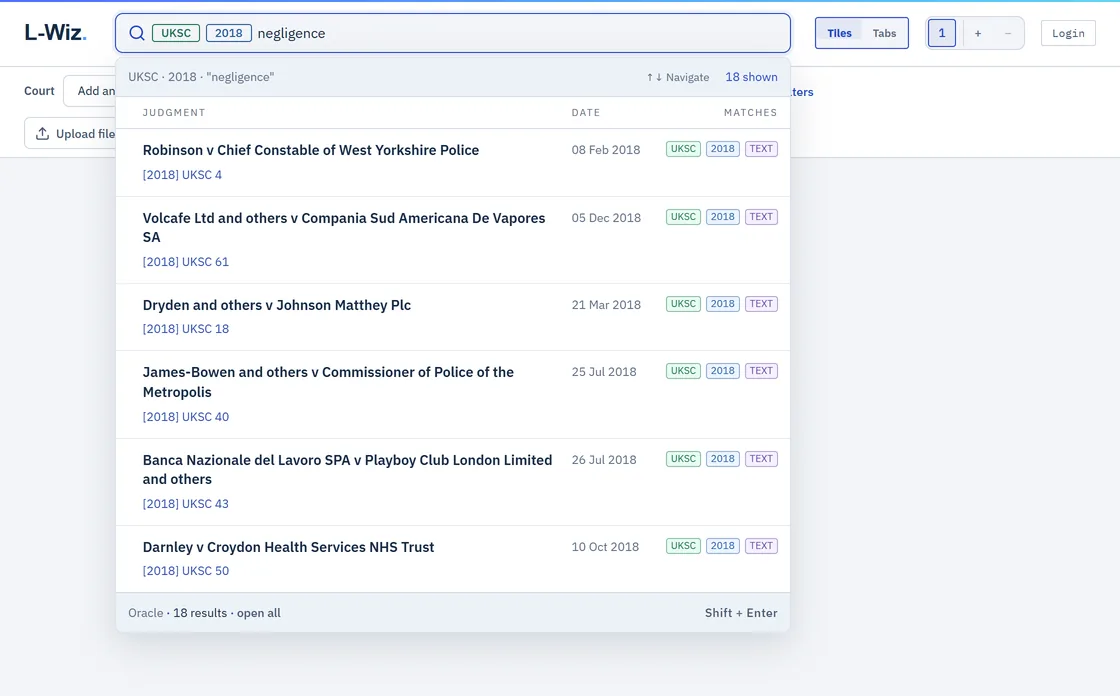
Explore, sort, filter and chart complete search results with Oracle. Compare judgments and keep a note beside the documents.
Recorded in L-Wiz. A negligence search is refined to Supreme Court cases from 2018. Oracle holds the results while two judgments open side by side. A passage is highlighted and a research note added. Silent demonstration.
Legal research
Legal information is distributed across different services, collections and publications.
Judgments may be published through one service, law reports through another, and legislation through a third. Each has its own search tools and interface, often requiring researchers to work across multiple websites while maintaining their notes separately.
General-purpose AI can simplify parts of this process, but generated answers may be incomplete or contain inaccurate citations. L-Wiz brings research and document management into one workspace, allowing users to examine the original authorities directly.
Explore the sources| Manual research | General AI | Traditional databases | L-Wiz | |
|---|---|---|---|---|
| Search efficiency | Repeated searches across sites | Variable retrieval and verification | Dedicated search tools | Fast, unified filtering and navigation |
| Reliability | Depends on source checking | Generated citations can be inaccurate | Established legal sources | Retrieved documents linked to original authorities |
| Workspace | Multiple tabs and PDFs | Extracts and summaries | Platform-dependent readers | Judgments side by side, in tabs or in their own windows |
| Notes | Separate documents | Chat-based notes | Varies by platform | Annotations beside each judgment, ready to export |
Research in L-Wiz
Start with your first search.
Type a citation, a party or a phrase. The workspace opens in your browser.
Open workspace